
Students at Widener Memorial will begin with the Anchoring Phenomenon -‘How does assistive technology make life easier?’ The first part of this unit will provide a foundation by defining, describing, and identifying common assistive technology (AT) in everyday life. Then the 9th-12th grade students will learn more about the specific and specialized AT Widener uses in our various classrooms and therapy areas. (including physical, occupational, speech, behavioral, aquatic, etc). The second part of the unit will revolve around the Investigative Phenomenon- ‘How does a manual wheelchair do work?’ Key concepts in work, motion, force, distance, power, and the six simple machines will be taught with hands-on labs, demonstrations, and experiments. This unit will culminate with a final project to engineer their answers to the Everyday Phenomenon ‘How could AT improve your current wheelchair/mobility device?’- Using a scientific approach, they will design and build prototypes using CAD software and 3-D printing of their models. Students will showcase at our end of year STEAM fair.
Background Information: I have the privilege to teach 9th -12th grade sciences at Widener Memorial School for students in our physical support program. This school was started by the wealthy Widener family when their son became wheelchair dependent after surviving polio. In 1902 they created a ‘residential school for physically handicapped kids’ to ensure these students had access to medical care and industry training’. And over 120 years later, that mission still holds true. The goal of the high school physical support program is to provide high quality medical care inside a comprehensive Philadelphia public school to prepare students for life after Widener both academically and functionally. And although I teach a wide variety of students both academically and medically, they are all deeply familiar—often through personal experience—with the various therapy programs including physical, occupational, speech, mental health, family, behavioral, etc. This being my first year at Widener (and first time working with such a unique population of students) is what attracted me to this TIP course. Ideally, as a result of this curriculum unit, students will move from being ‘consumers’ to being ‘designers/developers’ of assistive technology using Next Generation Science Standards (NGSS). I want to leverage the following concepts: Human Centered Design, Concept Engineering, the 7 Principles of Design, the 5 Steps to Identifying Customer Needs, and Exploring Vs. Solving. Unit Content: The Teachers Institute of Philadelphia Spring 2025 Course, Robots and Smart Tech for Physical Therapy, provided a novice like me with a fantastic education. Dr. Michelle Johnson uses her expertise in robotics for physical therapy and engaging teaching style to explain complex topics to our diverse class of 2nd grade autistic support teachers to high school math/science specific educators. The ability to tour actual robotic labs, see engineers demonstrate and explain their prototypes, and ask questions was the absolute highlight and I am so thankful to Dr. Johnson and her team for this once-in-a-lifetime experience. Every seminar covered critical content, and I truly enjoyed each class. And as it would be impossible to summarize everything, I selected the most critical topics to outline below as they most shaped the unit I will be bringing back to my classroom during the 2025-2026 school year. Seminar Meeting 1: Disability and Rehabilitations and User Assessment- It is essential to have commonly agreed upon definitions for key terms, the first of which is disability. However, this is complicated. Different organizations provide different meanings based on their specific criteria. For example, the Center for Disease Control (CDC) defines a disability as “any condition of the body or mind (impairment) that makes it more difficult for the person with the condition to do certain activities (activity limitation) and interact with the world around them (participation restrictions)”. The CDC lists nine types: vision, movement, thinking, remembering, learning, communicating, hearing, mental health, and social relationships. The World Health Organization (WHO) describes disability according to its three dimensions. The first is impairment in a person’s body structure or function or mental functioning. The second is activity limitation. And the third is that the disability that restricts the participation in normal daily lives. And according to data from the American Community Survey (a large survey done by the US Census Bureau annually) based on population size, civilians with disabilities increased from 13.5 percent in 2021 to 13.9 percent in 2022. Disabilities impact roughly one out of every seven people worldwide so this is not just an ‘American’ or ‘Philadelphia’ issue. And the experience of the disabled differs dramatically based on their environment. The National Council on Disability (NCD) provides an annual report on people with disabilities in America. It uses stakeholder input to select indicators based on data availability and areas of interest. As of 2024, the six areas include: employment, educational attainment, health and health care, financial status and security, leisure recreation, personal relationships, and crime/safety. These must be prioritized when designing robots and assistive technology for people with disabilities as we shift to a more Human Centered Design (HCD) approach. Assessments are a critical part of both diagnosis and treatment of disabilities. The Common Grading of Impairment evaluates based on two qualifiers. The first is performance- the extent to which the participant is restricted. The second is capacity- the extent to which an activity is limited without assistance. Assessments are also used to monitor progress after disabilities have been identified and supported. Seminar Meeting 2: AT Definition and Human Centered Design Part 1- Dr. Johnson defines assistive technology (AT) as “an umbrella term that includes assistive, adaptive, and rehabilitative devices for people with disabilities that also includes the process used in selecting, locating, and using them.” Their purpose is to improve the quality of life for their users. And they are commonly divided into low tech, medium, and high-tech tools. It is critical that AT meets industry standards so that users can expect their devices to have a high level of design, performance, cost-benefit, reliability and safety. Thankfully, there has been a shift to include the users of AT into this process using a Human Centered Design approach. Don Norman, in The Design of Everyday Things (revised and expanded edition), defines HCD as ‘an approach that puts human needs, capabilities, and behavior first, then designing to accommodate those needs, capabilities, and ways of behaving’. There are five steps to HCD and in order they are: gather raw data from customers, interpret the raw data in terms of customer needs, organize the needs into a hierarchy of primary, secondary, and (if necessary) tertiary needs, establish the relative importance of the needs and reflect on the results and the process. Seminar Meeting 3: Human Centered Design Part 2- HAAT and ATs Dr. Johnson taught the Human Activity Assistive Technology (HAAT) model as an example of a specific HCD framework. The case study was for Zinabu, a 13 year old living in rural Ghana diagnosed with Athetoid Cerebral Palsy. As a team, we designed custom AT to meet unique personality and stakeholders (H), and her current functions/ tasks/ skills/ and environment (A). Below is our HAAT model for the AT we designed for Zinabu. Potential Users/Stakeholders, competencies, abilities, basically everything you know about the person Desired Function/Tasks User wants but can not do without help, performance and skill, how often? All Envts for use including physical, social, cultural, institutional, Task device will complete, how it interfaces, affordable, portable, tech?, level of skill, training for caregiver, repairable, etc Female, 13 years old, lives in Rural Ghana with parents and 1 older brother. Attends school, grade 6, right handed, requires a wheelchair and caregiver. . Diagnosed with Athetoid Cerebral Palsy at 1. Desired task is to improve independent communication. Current Overall- Writing- unable Reading- high Typing- low/difficult Speaking- low/difficult Current Evaluation Scores show decent / average grip strength: Physical- Ghana’s climate and weather, rural infrastructure, school buildings and home apartment, etc. Social- Zinabu’s home and school community, cultural / religious institutions, infrastructure, and media. More information on all these required/needed. Tablet sized communication device designed around high level of reading ability, possibly with large click on options to be shared via pre programmed text or read aloud? Should be portable, able to use without wifi, durable, with a long lasting battery. Some sort of tripod that attaches to her wheelchair or a neck lanyard would ease Zinabu’s ability to use it independently. Needs some sort of case to protect it from climate during the rainy season and in case of dropping. More information is needed regarding high interest topics and test score interpretations. Seminal Meeting 7: Prototyping and ATs Brainstorming is the first step of the design process. It is important to remember these three things about the person with the disability. What can be done, what are their current skills/levels? What cannot be done, what are the limitations? And what will be done, what is the motivation? I found the IDEO’s Rules for Brainstorming that Dr. Johnson had us model for Zinabu’s AT device brainstorming essential in staying both goal focused and team oriented. The rules are to: Then it is time to develop a concept to provide a visual. This can be done using 2-dimensional or 3-dimensional sketches/models/prototypes. And the final step is to ‘pitch’ your design. This should be a short (3-5 mins tops) presentation to identify the problem and your audience, discuss why it is important to solve, and explain how your solution works including the benefits to your specific audience.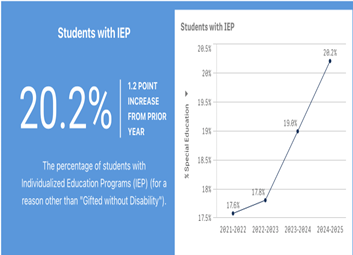 The School of District of Philadelphia (SDP) uses the Individual with Disabilities Education Act’s (IDEA) 13 disability categories for their individual education plans (IEPs). They are specific learning disability, speech/language, other health impairment, autism, intellectual disability, emotional disturbance, multiple disability, hearing impairment, orthopedic impairment, visual impairment, traumatic brain injury, and deaf-blindness. Their most recent data shows 20.2% of students within SDP have an IEP for some type of disability/disabilities. There is also a noticeable upward trend of students identified since 2021.
HUMAN
ACTIVITY
CONTEXT
ASSISTIVE TECH
Important Info to Consider-
Important Info to Consider-
Important Info to Consider-
Important Info to Consider-
Zinabu Case Specifics-
Zinabu Case Specifics-
Zinabu Case Specifics-
Recommendations based on limited information-
My goal is to develop a comprehensive unit that can engage all my students in some capacity while also scaffolding it with cognitive and/or physical disabilities allowing each to participate at an appropriate level. This will be done by dividing this unit into three pieces centered around three separate phenomena. Part One will begin with the Anchoring Phenomenon -‘How does assistive technology make life easier for people with disabilities?’ This will provide a foundation by defining, describing, and identifying common assistive technology (AT) in everyday life. Then the 9th-12th grade students will learn more about the specific and specialized AT Widener uses in our various classrooms and therapy areas in part two (including physical, occupational, speech, behavioral, aquatic, etc). This second part of the unit will revolve around the Investigative Phenomenon- ‘How does a manual wheelchair do work?’ Key concepts in work, motion, force, distance, power, and the six simple machines will be taught with hands-on labs, demonstrations, and experiments . This unit will culminate with part three and a final project to engineer their answers to the Everyday Phenomenon -’How could AT improve your current wheelchair/mobility device?- Using a scientific approach, they will design and build prototypes using CAD software and 3-D printing of their models. Students will showcase at our end of year STEAM fair. I would like this unit to include several hands-on elements and make connections to the Scientific Method. Lower level students will work on a group project where I provide details about a fictitious ‘Widener Wildcat’- aka a new student soon to join our school that needs our help with their wheelchair. Their contribution will be improving the design of a current technology and collecting Widener data similar to the fashion meets discretion section of design meets disability. For example, the new student might not like to use his walker because it is ‘ugly’. So they must think of a way to beautify it based on details I provide and then collect school wide data regarding the top Widener choice, then represented in some sort of bar graph. More advanced students will select their own design idea based on a personal issue/need and then develop a prototype using physical (cardboard, clay, paper, foam, etc ) or electronic (CAD and 3-d printing) materials.
Teaching Timeline: Part 1- Anchoring Phenomenon -‘How does assistive technology make life easier for people with disabilities? Lessons #1-2- Objective: Students will be able to discuss and debate the term disability to select a class definition. Lessons #3-4- Objective: Students will be able to list their specific disability/disabilities and how it/they impact their daily life and mobility Lesson #5- Objective: Students will be able to create a visual to identify their stakeholders Lesson #6- Objective: Students will be able to define AT in their own words and provide three examples used for mobility. Lessons #7-8: Objective: Students will be able to identify and explain specific assistive technology at Widener they use in PT/ OT/ speech, etc. and how it impacts their daily lives. Lessons #9-10: Objective: Students will be able to complete a variety of low stakes assessments to visually analyze (graph) the data each provides Part 2- Investigative Phenomenon-‘How does a manual wheelchair do work?’ Lesson #11: Objective: Students will be able to model how forces affect motion Lesson #12: Objective: Students will be able to restate Newton’s Three Laws of Motion and provide a real-life example of at least one law. Lesson #13: Objective: Students will be able to measure their person acceleration using their homemade accelerometers Lessons #14-15: Objective: SWBAT explain the structure and function of all six simple machines Lesson #16: Objective: Students will be able to design an electronic Rube Goldberg game that uses 3 complex machines to complete an everyday task. Part 3- Everyday Phenomena- How could AT improve your current wheelchair/mobility device? Key concepts in work, motion, force, distance, power, and the six simple machines will be taught with hands-on labs, demonstrations, and experiments Instructional Techniques and Tools: word/phrase/sentence, think pair share, video clips, brainstorming, acronym bingo, debate, democratic vote, role playing, interviews and field trips to PT/OT/speech/therapy departments at Widener, scavenger hunt, engaging assessments (color blind test, Stroop color and word test, ruler drop reflex test, memory matching, etc), graphing, Specifics: https://pz.harvard.edu/sites/default/files/Word-Phrase-Sentence.pdf – A routine for capturing the essence of a text. This thinking routine was adapted from the Text Rendering Experience from the School Reform Initiative by the Cultures of Thinking project at Project Zero, Harvard Graduate School of Education. Select a word that captured your attention or struck you as powerful. • Pick a phrase that moved, engaged, or provoked you. • Highlight the sentence that was meaningful to you, that you felt captures the core idea of the text. https://www.youtube.com/watch?v=cFtg2xub10E – breakdown video for the 14 categories of disabilities for students to understand the breakdowns https://bingobaker.com/view/189359– bingo card for special education terms and abbreviations https://www.youtube.com/watch?v=zKyjshcxbI0– student friendly video to explain the history and purpose of ADA https://www.youtube.com/watch?v=beEcCIX_mRs– The Stroop Effect, a demonstration of how this test works and some practice versions to do with students https://media.newsela.com/article_media/extra/5.5.18_Debate.pdf– a template for a debate worksheet with notes to do with classes. Have them select one side and then switch to debate the other side. https://www.weteachnyc.org/resources/resource/rube-goldberg-game/– online interactice Rube Goldberg building machine using simple and complex machines SDP Curriculum Connections: 8 Steps in Next Generation Science Standards (NGSS) 3 Core Engineering Design Component Ideas (NGSS)